カート

ショッピングカートに商品は入っていません

お買い物へ進む
1 / 1

70° Human Eye Simulation Lens for AR/VR Testing | VA70-67-ENX

$0.00 USD
決済する時に送料が計算します
数量
70° Human Eye Simulation Lens

Description

Features of 70° Human Eye Simulation Lens

  • Ultra-high image clarity.
  • Electronic control of focus and Rx lens group adjustment.
  • Diopter adjustment range: +4 D to −6 D.
  • Astigmatism adjustment range: 0–4 D.
  • Folded optical path on the object side saves installation space.
  • Supports projector applications.
  • Compatible with colorimeters.

Technical Specifications of 70° Human Eye Simulation Lens

Parameter VA70-67-ENX VA70-67-EN
Field of View (FOV) 70° 70°
Compatible Sensor Diameter 67 mm 67 mm
Aperture Diameter 4 mm standard; 2–5 mm optional 4 mm standard; 2–5 mm optional
Working Distance 250 mm to infinity 250 mm to infinity
Mount M72 (adaptable) M72 (adaptable)
Chief Ray Angle ≤1.2° ≤1.2°
Maximum F-theta Distortion <4.8% <4.8%
Back Focal Distance 80 mm 80 mm
Operating Wavelength 420–680 nm 420–680 nm


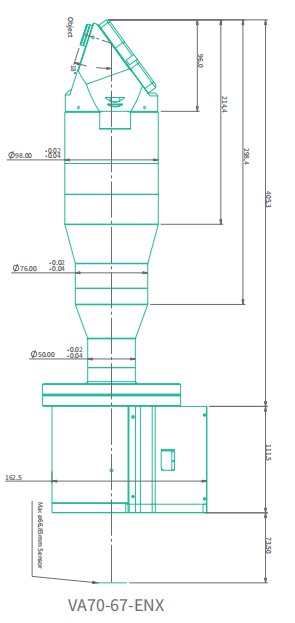
Photograph


FAQ of 70° Human Eye Simulation Lens

1. How does the electronic focus control of the 70° Human Eye Simulation Lens improve AR/VR testing?

The lens supports electronic control of both focus and the Rx lens group, allowing test systems to change optical settings without repeatedly adjusting the lens by hand. As an Electronic Focus Lens, it can improve setting repeatability and support automated test sequences. The communication protocol and control software should be confirmed before system integration.

2. What vision conditions can the 70° Human Eye Simulation Lens simulate?

The spherical diopter adjustment range is +4 D to −6 D, while the astigmatism adjustment range is 0–4 D. These ranges allow the Conoscope Lens to evaluate AR/VR display performance under different refractive conditions. Astigmatism axis settings and adjustment increments should be confirmed if they are critical to the test plan.

3. Why does the 70° Human Eye Simulation Lens use a folded optical path on the object side?

The folded optical path reduces the straight-line installation depth required in front of the test system. This makes the lens easier to integrate into compact AR/VR test stations. When installed as a Near-Eye Display Testing Lens, sufficient space must still be reserved for eye-position alignment, cabling and mechanical adjustment.

4. Can the 70° Human Eye Simulation Lens connect directly to a projector or colorimeter?

The lens supports projector applications and is compatible with colorimeters. As an AR/VR Display Test Lens, it provides an adaptable M72 mount, supports a 67 mm sensor diameter and has an 80 mm back focal distance. The camera interface, adapter, sensor position and color calibration should be verified for the selected instrument.

5. Why does the 70° Human Eye Simulation Lens offer different aperture diameters?

The standard aperture diameter is 4 mm, with optional sizes from 2 mm to 5 mm. Different apertures allow the test condition to represent different pupil sizes. Because changing the aperture affects captured light and measurement conditions, luminance, uniformity and color measurements should be recalibrated after the aperture is changed.

6. Is the 70° Human Eye Simulation Lens suitable for near-infrared display testing?

Its specified operating wavelength is 420–680 nm, covering the main visible-light range. It is suitable for visible AR/VR display and color measurements, but performance beyond 680 nm is not specified. Near-infrared testing therefore requires separate spectral-performance.

Important Note

Important Shipping & Customs Information
 
Please note: Your order total includes product cost and shipping fees only. Import duties and customs fees are not included and will be collected separately by your local customs authority upon delivery.
 
Customs & Duties
  • Import duties vary by destination country and are determined by your local customs office
  • You will be contacted directly by customs or the delivery carrier to arrange payment
  • Oklab cannot pre-collect customs fees as rates differ across international destinations
 
Additional Documentation
If your delivery location requires special documentation (such as tax ID numbers or import licenses), our team will contact you after order placement to obtain the necessary information.
 
Questions?
For shipping inquiries, please contact us at sales@oklab.com
 
By placing an order, you acknowledge responsibility for any applicable import duties, taxes, and customs fees in your country.
  • Description

  • Important Note

Features of 70° Human Eye Simulation Lens

  • Ultra-high image clarity.
  • Electronic control of focus and Rx lens group adjustment.
  • Diopter adjustment range: +4 D to −6 D.
  • Astigmatism adjustment range: 0–4 D.
  • Folded optical path on the object side saves installation space.
  • Supports projector applications.
  • Compatible with colorimeters.

Technical Specifications of 70° Human Eye Simulation Lens

Parameter VA70-67-ENX VA70-67-EN
Field of View (FOV) 70° 70°
Compatible Sensor Diameter 67 mm 67 mm
Aperture Diameter 4 mm standard; 2–5 mm optional 4 mm standard; 2–5 mm optional
Working Distance 250 mm to infinity 250 mm to infinity
Mount M72 (adaptable) M72 (adaptable)
Chief Ray Angle ≤1.2° ≤1.2°
Maximum F-theta Distortion <4.8% <4.8%
Back Focal Distance 80 mm 80 mm
Operating Wavelength 420–680 nm 420–680 nm


Photograph


FAQ of 70° Human Eye Simulation Lens

1. How does the electronic focus control of the 70° Human Eye Simulation Lens improve AR/VR testing?

The lens supports electronic control of both focus and the Rx lens group, allowing test systems to change optical settings without repeatedly adjusting the lens by hand. As an Electronic Focus Lens, it can improve setting repeatability and support automated test sequences. The communication protocol and control software should be confirmed before system integration.

2. What vision conditions can the 70° Human Eye Simulation Lens simulate?

The spherical diopter adjustment range is +4 D to −6 D, while the astigmatism adjustment range is 0–4 D. These ranges allow the Conoscope Lens to evaluate AR/VR display performance under different refractive conditions. Astigmatism axis settings and adjustment increments should be confirmed if they are critical to the test plan.

3. Why does the 70° Human Eye Simulation Lens use a folded optical path on the object side?

The folded optical path reduces the straight-line installation depth required in front of the test system. This makes the lens easier to integrate into compact AR/VR test stations. When installed as a Near-Eye Display Testing Lens, sufficient space must still be reserved for eye-position alignment, cabling and mechanical adjustment.

4. Can the 70° Human Eye Simulation Lens connect directly to a projector or colorimeter?

The lens supports projector applications and is compatible with colorimeters. As an AR/VR Display Test Lens, it provides an adaptable M72 mount, supports a 67 mm sensor diameter and has an 80 mm back focal distance. The camera interface, adapter, sensor position and color calibration should be verified for the selected instrument.

5. Why does the 70° Human Eye Simulation Lens offer different aperture diameters?

The standard aperture diameter is 4 mm, with optional sizes from 2 mm to 5 mm. Different apertures allow the test condition to represent different pupil sizes. Because changing the aperture affects captured light and measurement conditions, luminance, uniformity and color measurements should be recalibrated after the aperture is changed.

6. Is the 70° Human Eye Simulation Lens suitable for near-infrared display testing?

Its specified operating wavelength is 420–680 nm, covering the main visible-light range. It is suitable for visible AR/VR display and color measurements, but performance beyond 680 nm is not specified. Near-infrared testing therefore requires separate spectral-performance.

Important Shipping & Customs Information
 
Please note: Your order total includes product cost and shipping fees only. Import duties and customs fees are not included and will be collected separately by your local customs authority upon delivery.
 
Customs & Duties
  • Import duties vary by destination country and are determined by your local customs office
  • You will be contacted directly by customs or the delivery carrier to arrange payment
  • Oklab cannot pre-collect customs fees as rates differ across international destinations
 
Additional Documentation
If your delivery location requires special documentation (such as tax ID numbers or import licenses), our team will contact you after order placement to obtain the necessary information.
 
Questions?
For shipping inquiries, please contact us at sales@oklab.com
 
By placing an order, you acknowledge responsibility for any applicable import duties, taxes, and customs fees in your country.

You may also like